If you want dash-cam footage that’s clear enough to identify vehicles and readable enough to support a claim, you need to choose based on more than “4K vs. 1080p.” This guide helps you understand the key specs and trade-offs—video quality, storage, parking mode, and privacy—so you can pick a dash cam that fits your driving habits and your tolerance for setup and maintenance.
Dash cam basics: what the device actually does
A dash cam is a vehicle-mounted camera system that continuously records while you drive. Most models write video in short clips (often a few seconds to a minute each) to an internal storage card. When an event is detected or you manually trigger it, the camera marks the relevant clips as protected so they are not overwritten during normal recording.
Continuous recording vs. event recording
Two behaviors matter for real-world usefulness:
- Loop recording: The camera overwrites the oldest unprotected clips once storage fills up.
- Event protection: Some cams protect clips automatically using sensors (commonly G-sensor/impact detection) and/or motion detection. Others rely more on manual button presses or app controls.
When you’re comparing models, prioritize how reliably they protect the right moment rather than only how “sharp” the video looks in ideal conditions.
Video quality: resolution is only part of the picture
Dash-cam marketing often emphasizes resolution (for example, 1080p, 2K, or 4K). Resolution helps, but dash-cam image quality is also driven by lens quality, sensor performance, bitrate, exposure control, and how the camera handles low light and glare.
Key terms you’ll see in listings
- Resolution: The number of pixels in the image. Higher resolution can preserve detail, but only if the camera records at a sufficiently high bitrate.
- Bitrate: The amount of data recorded per second. Higher bitrate generally helps reduce compression artifacts, especially in complex scenes (night traffic, rain, headlights).
- Frame rate (fps): Frames per second. Higher fps can improve motion clarity, but it may require more storage and can reduce bitrate if the camera has fixed resources.
- HDR / WDR: High Dynamic Range or Wide Dynamic Range. These features aim to balance bright and dark areas (e.g., headlights vs. road surface). Performance varies by model.
- Night performance: Not a single spec. It depends on sensor size, lens aperture, processing, and stabilization.
What to look for when comparing “same resolution” cameras
Two dash cams can both claim the same resolution but produce different usable footage. When possible, compare:
- Recorded bitrate (not just “max”): Some listings provide bitrate ranges or “high/medium/low” settings. If you can choose, higher settings usually improve clarity but increase storage use.
- Lens and sensor details: Look for credible descriptions of lens quality and sensor class. If the listing is vague, treat performance expectations cautiously.
- Stabilization and exposure behavior: A camera that overexposes headlights or underexposes license plates may still look “sharp” on a spec sheet but fail in practice.
Front-only vs. dual-channel (front + rear)
Dual-channel dash cams record both the road ahead and behind. This can be valuable for incidents involving following vehicles, backing maneuvers, or rear-end collisions. The trade-off is that storage and processing are split across two streams, which can reduce per-camera bitrate compared with a single-channel setup.
If you choose dual-channel, confirm that the camera maintains a reasonable bitrate for both channels at your selected resolution and frame rate. Otherwise, you may end up with two “okay” videos instead of one clearly readable one.
Storage: how much recording you can actually store
Dash cams typically use microSD cards. Storage capacity and card quality directly affect reliability and how long you can record before older clips are overwritten.
MicroSD card requirements
Not all microSD cards behave well in dash-cam conditions. Look for:
- Dash-cam or high-endurance classification: Many dash cams require cards rated for continuous recording and high write endurance.
- Compatibility with the camera: Manufacturers often list supported card capacities and sometimes specific brands/models.
- Speed class: The camera needs sustained write performance to avoid dropped frames or recording errors.
If you use a card that’s not recommended, you may see corrupted files, recording interruptions, or frequent card failures—especially when the camera is writing continuously and during event protection.
Capacity planning: estimate your “hours of footage”
Dash cams overwrite old clips, so the practical question is how long your loop recording lasts at your chosen settings (resolution, fps, bitrate, and number of cameras).
Because exact storage consumption varies by model and settings, use manufacturer guidance when available. If not, you can still plan logically:
- Higher resolution + higher fps + higher bitrate = faster storage consumption.
- Dual-channel recording uses more storage than front-only.
- Parking mode can multiply total recording time if it captures motion events for long periods.
Storage maintenance: formatting and card health
Most dash cams format the card internally. Avoid repeatedly formatting on a computer unless the manufacturer recommends it. If you notice recording errors, file corruption, or frequent “card error” messages, replace the card. Even high-endurance cards have a finite lifespan under heavy write cycles.
Parking mode: what it is, how it works, and why it’s tricky
Parking mode is recording while the vehicle is parked. It’s usually triggered by motion detection and/or impact detection. The goal is to capture incidents when you’re not driving, such as a hit-and-run or a nearby vehicle’s movement.
Common parking-mode approaches
- Motion detection: The camera records when it detects movement in the frame. This can capture useful events but may also trigger on shadows, passing headlights, or swaying trees.
- Impact/G-sensor: The camera records when it detects a jolt. This can be more selective but may miss slow or non-impact events.
- Time-lapse parking: Some systems record at intervals rather than continuously. This reduces storage use but may miss the exact moment of an incident.
Power for parking mode: built-in vs. hardwire
Parking mode requires power. Many dash cams offer parking mode only when connected to the vehicle’s electrical system (hardwire kit) or when using an external power solution. Some models include a built-in battery, but the runtime is typically limited and depends on temperature and settings.
Because vehicle electrical setups vary, follow the dash-cam manufacturer’s instructions and any recommended wiring method. Incorrect installation can cause battery drain, blown fuses, or malfunctioning vehicle electronics.
Parking mode trade-offs you should plan for
- Storage wear: Parking mode can dramatically increase total writes, shortening card life.
- False triggers: Motion detection can fill storage with irrelevant clips.
- Battery drain risk: If parking mode draws power without proper voltage management, it can reduce starting reliability.
How to configure parking mode to reduce wasted footage
Even with the same hardware, configuration changes outcomes. Practical steps:
- Use motion sensitivity settings conservatively to avoid constant triggers.
- Set a parking mode duration window if your camera supports it (for example, only during the first hours after you park).
- Prefer impact detection for low-light or busy areas where motion triggers are noisy.
- Ensure the camera’s time and date are correct so protected clips are easier to interpret.
Privacy: what’s recorded, who can access it, and how to reduce exposure
Dash cams capture video of the road and often include faces, license plates, and interior details. Privacy expectations vary by jurisdiction and by how you share footage. Even where recording is permitted, you should still consider how footage is stored and who might access it.
Privacy risks to think about
- Unintended sharing: Uploading clips to social media or messaging apps can expose personal data.
- Physical access: If someone can remove the card or access the camera, they may view stored footage.
- Cloud/app features: Some dash cams offer smartphone apps, cloud backups, or sharing tools. These features can increase exposure if not configured carefully.
Privacy controls to look for
When available, prioritize:
- Local storage only: Cameras that store footage on the card without mandatory cloud upload can reduce third-party exposure.
- Passcodes or app authentication: Helps prevent casual access.
- Protected-clip management: Ability to delete or manage clips you don’t want retained.
- Clear indicator lights: Some users prefer visible indicators when recording is active.
Also check whether the camera supports privacy masking (blurring parts of the image). Availability varies by model.
Installation and aiming: where “good specs” become “usable footage”
A dash cam’s value depends heavily on placement and calibration. Poor aiming can make license plates unreadable even if the video is high resolution.
Placement basics
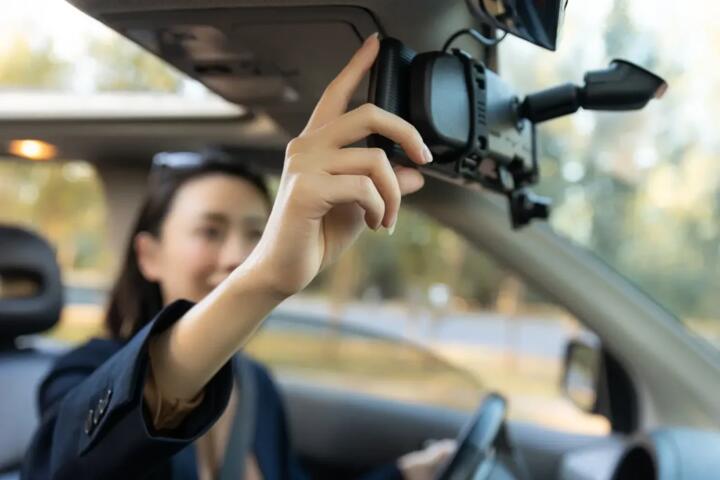
- Mount location: Many cams mount behind the rearview mirror to reduce glare and keep the view unobstructed.
- Windshield considerations: Some windshields have coatings that can affect reflections. Avoid placing the camera where it captures heavy glare from the dashboard.
- Wiring route: Use the manufacturer’s recommended routing to avoid interfering with airbags, pedals, or driver visibility.
Aiming for readability
When you set the camera angle, aim for a balance between road visibility and plate readability. A common mistake is aiming too high (you see more sky, less detail) or too low (you capture the hood edge and lose distant context). If the camera has a live view app, use it to verify that:
- Lane markings and traffic ahead are visible.
- Vehicles at typical following distances have readable plate area.
- The horizon is not tilted so clips are easier to interpret.
Step-by-step: choosing and setting up your dash cam
Step 1: Decide your channel needs
- If you mainly want evidence for forward incidents, front-only may be sufficient.
- If you frequently deal with tight parking, frequent reverse maneuvers, or want rear context, consider dual-channel.
Step 2: Pick a quality target you can sustain
Choose resolution and frame rate settings you can run consistently without exhausting storage too quickly. If the camera offers multiple quality profiles, test the one you plan to use most days.
Step 3: Plan storage and card endurance
- Select a microSD card capacity that matches your expected loop duration.
- Use the manufacturer’s recommended card list if provided.
- Budget for periodic card replacement if you use parking mode.
Step 4: Configure parking mode realistically
- Start with conservative motion sensitivity.
- Limit parking mode duration if your camera supports it.
- Confirm the camera’s power draw behavior (especially if hardwired) to avoid battery drain.
Step 5: Verify event protection works
Before relying on it, do a controlled check:
- Confirm that manual “save” works.
- Check that impact detection protects the correct clip window.
- Review a few saved events to ensure the timestamp and file naming are correct.
Common mistakes that reduce usefulness
- Overestimating resolution: A higher-resolution camera with low bitrate can still produce blocky details.
- Using the wrong microSD card: Non-endurance cards can fail under continuous recording.
- Ignoring parking-mode triggers: If motion sensitivity is too high, storage fills with irrelevant clips.
- Mounting too high or too low: You may lose the plate region or capture glare instead of the scene.
- Not checking time settings: Incorrect time makes footage harder to interpret and share.
- Assuming “4K” means “license plates readable at night”: Night clarity depends on multiple factors beyond resolution.
Ownership costs and maintenance implications
Dash-cam ownership isn’t only the purchase price. Ongoing costs and effort depend on storage and parking mode.
Typical ongoing costs
- Replacement microSD cards: Continuous recording and parking mode increase write cycles.
- Power accessories (if needed): Hardwire kits or external power solutions may be required for parking mode on some models.
- Occasional firmware updates: Some manufacturers provide updates that can improve stability or features. Only install updates from the manufacturer’s official channels.
Maintenance habits that help
- Keep the lens clean (dust and film can reduce contrast).
- Periodically check that the camera is recording and that the card isn’t reporting errors.
- Review protected clips occasionally to confirm they are not being overwritten.
Decision framework: match features to your use case
Use the checklist below to narrow your options. The “best” dash cam is the one that records the moments you care about with enough clarity, without creating a setup you won’t maintain.
| What you care about | What to prioritize | What to watch out for |
|---|---|---|
| Clear forward evidence | Front channel quality, stable exposure, sufficient bitrate | Overly high resolution with low bitrate; poor aiming |
| Rear incidents and parking context | Dual-channel support and balanced recording settings | Storage split across two streams; verify per-channel clarity |
| Hit-and-run or off-hours incidents | Parking mode with impact/motion options and reliable event protection | False triggers; storage wear; battery drain if power is unmanaged |
| Privacy-sensitive use | Local-only storage options, app security, privacy masking if available | Cloud features and easy sharing; physical access to the card |
Practical examples: which setup fits which driver?
Example A: mostly commuting, limited parking mode
If you drive daily and park in relatively predictable conditions, you may prioritize front-channel clarity and a storage setup that supports your chosen quality settings. Parking mode can be configured conservatively or disabled if you don’t want extra storage wear and false triggers.
Example B: frequent tight parking and reverse maneuvers
Dual-channel recording can help capture rear context. In this case, ensure the camera maintains usable bitrate on both channels at your selected settings, and aim the rear camera so it covers the area where incidents are likely.
Example C: you want off-hours incident coverage
Parking mode becomes the core feature. Plan for higher storage usage and consider how the camera is powered. Configure motion sensitivity and duration to reduce irrelevant clips, and verify that protected events are saved correctly.
Final checklist before you buy
- Video clarity: Look beyond resolution; confirm bitrate/frame rate options and HDR/WDR behavior.
- Channel coverage: Choose front-only or dual-channel based on the incidents you want to capture.
- Storage compatibility: Use recommended endurance microSD cards and plan loop duration for your settings.
- Parking mode feasibility: Understand how it triggers and how it’s powered; configure it to avoid constant false recordings.
- Privacy controls: Prefer local storage, secure access, and manage sharing habits.
- Installation and aiming: Plan mounting location and verify readability with a live view if available.
If you want, you can use the internal links below to go deeper on specific decisions without duplicating this guide’s fundamentals.
Dash cam video settings: resolution, bitrate, and frame rate explained, How to choose a microSD card for dash cams (endurance and compatibility), Parking mode options: motion detection vs impact detection vs time-lapse, Hardwiring a dash cam: power management and battery-drain risks, Dual-channel dash cams: how to balance front and rear recording quality, Dash cam privacy: local storage, app access, and masking features, How to install and aim a dash cam for readable license plates, Common dash cam failures: corrupted files, dropped frames, and card errors