Mesh Wi‑Fi can be a practical upgrade for homes with dead zones—especially if you work from home, stream in multiple rooms, or rely on smart devices. This FAQ focuses on the most common questions about coverage, speed, setup, and compatibility, with notes that matter for real-world use (including typical home layouts and the way people connect devices).
1) What is mesh Wi‑Fi, and how is it different from a single router?
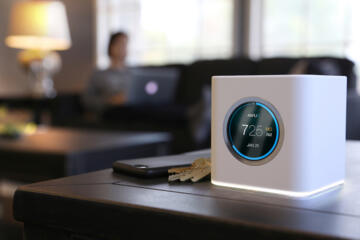
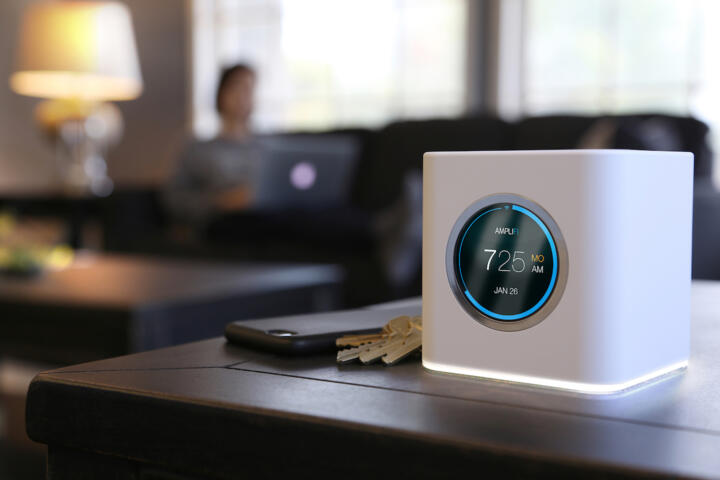
Mesh Wi‑Fi uses multiple wireless nodes to create one network name (SSID) that devices can roam between, instead of relying on a single router’s range. Each node communicates with the others, so coverage can extend farther than a standalone router, particularly in larger homes or multi-story layouts.
Whether it feels “faster” depends on how nodes connect (wireless backhaul vs. Ethernet backhaul) and how much interference exists in your area.
2) How much coverage will a mesh system provide in my home?
Mesh coverage depends more on your home’s layout and construction than on the marketing “square footage.” Thick walls, metal surfaces, concrete floors, and long distances between nodes can reduce signal quality. Placement is critical: nodes should be spaced so each one can still hear the others well.
If you can, use an Ethernet backhaul or place nodes closer together to improve reliability. For a room-by-room plan, see how to place mesh nodes for best coverage.
3) Will mesh Wi‑Fi always be faster than my current router?
Mesh Wi‑Fi is not automatically faster; it’s often more consistent. If your current router struggles in certain rooms, mesh can improve usable speeds there by providing a stronger connection. In the same room as the main node, performance may be similar.
Wireless backhaul can become a bottleneck, especially when many devices stream at once. To understand what to expect, check your system’s Wi‑Fi generation (Wi‑Fi 5/6/6E/7) and whether it supports wired backhaul.
4) What is “backhaul,” and why does it matter for speed?
Backhaul is the link between mesh nodes. If nodes connect wirelessly, they share airtime for both client traffic and node-to-node communication, which can reduce throughput. If you connect nodes with Ethernet (wired backhaul), you typically preserve more speed and reduce latency.
When planning, prioritize a strong backhaul path. If you want a practical checklist, read mesh backhaul options: wired vs. wireless.
5) How do I set up mesh Wi‑Fi correctly (and avoid common mistakes)?
Start by placing the main node near your modem/router and ensuring it has a stable power connection. Then add satellite nodes one at a time, using the app’s signal guidance or a simple test (walk around with a phone and check signal strength). Avoid placing nodes behind TVs, inside cabinets, or in corners.
After setup, confirm that your devices are joining the mesh network you expect (same SSID) and that any “smart connect” or band-steering features are enabled if your system offers them.
6) Is mesh Wi‑Fi compatible with all devices and smart home platforms?
Most modern mesh systems work with common Wi‑Fi devices, but compatibility can vary by Wi‑Fi band (2.4 GHz vs. 5 GHz), security mode (WPA2/WPA3), and whether your devices support the required Wi‑Fi generation. Many smart home devices use 2.4 GHz, so ensure that band is available and stable.
Before buying, verify your device requirements and your mesh system’s supported security and bands. If you’re unsure where to look, use a compatibility checklist for smart home and IoT devices.
7) How much does mesh Wi‑Fi cost, and what drives the total price?
The total cost depends on how many nodes you need, whether you require Ethernet backhaul, and which Wi‑Fi generation and features you choose (for example, advanced security, guest networks, or multi-gig ports). Some systems sell as kits; others require adding extra nodes later.
Also consider ongoing costs like subscriptions (if any), replacement power supplies, and whether you’ll need new cabling for wired backhaul. For a budgeting approach, see how to estimate mesh Wi‑Fi cost for your home.
8) What are the risks or downsides of mesh Wi‑Fi?
The main downsides are potential performance bottlenecks (especially with wireless backhaul), setup complexity, and the possibility that poor node placement won’t fix dead zones. Some systems may also require firmware updates, and app-based management can be inconvenient if you prefer a more traditional router interface.
To reduce risk, plan placement before installation and keep expectations realistic: mesh improves coverage and consistency, but it can’t overcome extremely poor backhaul links or heavy interference.
9) How do I maintain mesh Wi‑Fi, and how often should I update it?
Maintenance usually means keeping firmware up to date, monitoring node status in the app, and occasionally rebooting if the system becomes unstable. Update frequency varies by manufacturer, but it’s generally wise to install updates when they address security or known bugs.
Also review your device list and remove old or unused devices if your system supports it. For deeper guidance, check mesh Wi‑Fi maintenance and troubleshooting basics.
10) What are common edge cases—like apartments, basements, or interference from neighbors?
In apartments, interference from neighboring networks can be significant, and walls may block 5 GHz more than 2.4 GHz. Basements and garages often need careful node placement, and a node placed too far from the main node may connect weakly, causing slow speeds.
If you have heavy interference, consider using the system’s band-steering features (if available) and placing nodes to improve backhaul quality. For multi-floor homes, plan node locations so each satellite has a reliable path to the main node.
Closing: What to verify for your own vehicle and home setup
Before you choose or configure a mesh system, verify your home’s layout (walls, floors, and distance), your internet plan’s speed tier, and whether you can use wired backhaul. Also confirm device compatibility (especially 2.4 GHz support and security mode) and check whether your mesh system supports the features you rely on, such as guest networks or advanced parental controls. If you’re troubleshooting, focus first on node placement and backhaul quality.