What Is the Fake Delivery Text?
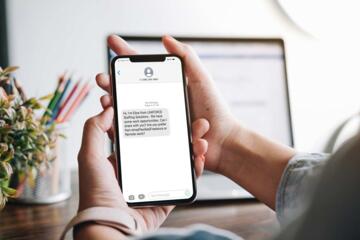
The fake delivery driver text is a form of phishing attack where fraudsters send deceptive text messages claiming to be from popular courier services such as FedEx, UPS, or DHL. These messages often alert a recipient about a missed parcel, a failed delivery attempt, or a delivery delay. They include links or phone numbers that supposedly offer ways to reschedule or track the package.
For example, in 2023, a cybersecurity report noted over 80,000 consumer complaints related to delivery scam texts alone. These texts might mention specific parcel tracking numbers or use brand logos—adding a veneer of legitimacy.
Sometimes, they even exploit real-time events like holiday season shipping delays to seem more credible. The targeted individuals often do not realize they fall victim until their personal information or device is compromised. This has caused millions in financial losses worldwide, reported by the Better Business Bureau and other watchdogs.
Common Pitfalls
Many believe these messages are harmless or that they can identify scams easily. Wrong assumption. These texts are crafted to bypass rational suspicion by mimicking real notifications down to the wording and timing.
People often tap on the included links or call provided numbers, providing access to personal details, bank credentials, or even unknowingly installing malware. A single click can unleash spyware, ransomware, or allow fraudsters to control the phone remotely.
The digital footprints stolen in one attack can fuel related scams like identity theft or credit card fraud. One large retailer lost 1,200 customers to a fake delivery scam in just two months—an incident caused by a phishing SMS campaign targeting their shoppers.
How to Block the Scam
Verify Sender Information
Look beyond the displayed phone number. Real delivery texts often come from shortcodes or official service numbers. Checking the official website for authorized communication channels prevents confusion. For instance, FedEx typically uses 4-6 digit shortcodes, not normal mobile numbers.
Use Package Tracking Apps
Download official courier apps or use verified tracking portals instead of following links from texts. These apps generate real-time updates. UPS’s app had more than 15 million downloads in 2023, proving its popularity and safety. This cuts the risk of clicking phony links drastically.
Check for Grammar and Formatting Errors
Fake texts often have odd language or typos. Legit companies hire professionals to craft clear, error-free messages. Even a slight misspelling or suspicious phrasing warrants distrust and report.
Confirm Deliveries Through Email or Account
Most genuine shipment updates come via email or your specific account on retailer websites. Checking your account or previous orders helps verify claims made in messages. Amazon, for example, sends detailed emails alongside app notifications.
Use SMS Spam Filters and Security Apps
Mobile platforms offer spam filtering options. Android’s built-in spam protection and iOS settings block known scam sources. Security apps like Norton Mobile Security add another layer, scanning messages and links for threats. Phones tend to stay cleaner with these protections activated.
Never Share Sensitive Data Through SMS
Legitimate companies rarely ask for passwords, payment info, or social security numbers via text. If prompted, it's likely a scam. Always pause and consider before responding to such requests. Your instincts often catch suspicious vibes first.
Report Suspicious Messages
Forward scams to carrier services or bodies like the FTC. Reporting helps block numbers and warn others. Most carriers support easy reporting via shortcodes like 7726 (SPAM).
Enable Two-Factor Authentication
2FA on online accounts reduces harm if attackers gain partial access. A code sent to your phone complements passwords, adding protective hurdles. Apps like Google Authenticator or hardware keys can help.
Regularly Update Device Software
Updates patch vulnerabilities exploited by malware delivered through phishing. Both Android and iOS release monthly security patches; ignoring them leaves your device exposed to the latest threats.
Examples of Real Incidents
A mid-sized US electronics retailer experienced a 45% surge in customer service calls due to scam texts imitating their brand in early 2024. They implemented SMS verification and customer alerts on their website, reducing scam-related complaints by 80% within four weeks.
Another case involved a logistics startup hit by a rogue text campaign that spoofed their tracking numbers. After adopting multi-factor authentication and educating customers through email campaigns, fraudulent clicks dropped from 2,000 weekly to under 200.
Scam Check: Key Signals
| Signal | What It Means | Example | Response |
|---|---|---|---|
| Unknown sender number | Not matching official channels | Long random mobile digits | Block sender; Verify elsewhere |
| Urgent call to action | Pressures quick response | ""Click now to claim"" | Ignore; check official site |
| Links with strange domains | Not official; often misspelled | fedex-delivery123.com | Don’t click; report |
| Requests for personal info | Legitimate firms avoid SMS data requests | ""Confirm your password"" | Never reply; verify via account |
Errors That Expose You
Clicking links without checking URL is classic. It only takes a glance to see if the domain looks off—but 90% don't bother. Falling for an unsolicited phone call claiming to be a delivery manager? That’s another common trap. The scammers often pose as helpful staff to extract info.
Responding immediately to threatening language—like ""your package will be destroyed""—pushes rushed decisions. If you aren’t sure, pause and verify through official channels.
Sharing screenshots or forwarding the text might spread the scam further. Instead, report silently to avoid amplifying the attack.
FAQ
How to tell if a delivery text is fake?
Check the sender number against official channels, avoid clicking links, look for grammar errors, and verify package details on official websites or apps.
What brands are commonly faked?
FedEx, UPS, DHL, USPS, and Amazon delivery notifications are most often imitated due to their large user bases.
Can my phone get infected from these texts?
Yes, some links install malware or spyware which can access sensitive data or control your device remotely.
Why do scammers use delivery themes?
Because parcel delivery is a common, anticipated event, making people less suspicious and more likely to engage quickly.
Is it safe to call the number in the text?
No. These callers may impersonate the company and try to extract personal or financial information.
Author's Insight
In over a decade monitoring phishing, fake delivery texts stand out for their sheer volume and creativity. The scammers often adapt to security measures faster than companies can update warnings. I’ve personally seen phishing tools update three times in a month to evade filters, which, frankly, most people skip checking. The best defense involves skepticism paired with verified sources. My recommended step: install official delivery apps and block suspicious contacts immediately.
Summary
Fake delivery texts aim to steal data under the guise of shipping alerts. Ignoring urges to click links, cross-checking senders, and using official tracking systems stops most attacks. Reporting suspicious messages and activating phone protection layers keeps your information safe. Stay alert — scammers adjust tactics quickly, so vigilance beats complacency every time.