Why Size Matters
People buy power banks the same way they buy luggage: too big, too cheap, or five minutes before boarding. Then reality shows up. The 30,000mAh brick barely fits in a carry-on, weighs 1.4 pounds, and still charges slowly because the cable is awful.
Airlines changed the conversation too. Most carriers cap lithium-ion batteries at 100Wh in carry-on bags unless you get approval. That translates to roughly 27,000mAh for many consumer power banks. Go above that and airport security may suddenly care very much about your backpack.
Small gear wins often.
A 10,000mAh bank usually charges a modern iPhone close to two full times. A 20,000mAh model handles a phone, earbuds, Kindle, and some laptop support during a long travel day. Beyond that, the benefits shrink unless you work remotely or spend long stretches away from outlets.
Travel changed charging habits. Airports now have USB stations everywhere, trains added outlets, and hotels stuffed lamps with charging ports that wobble after 6 months...
Where Travelers Get Burned
The biggest mistake is buying capacity instead of convenience. People see “40,000mAh” on Amazon and imagine freedom. What they get is a dense black rectangle that overheats inside a sling bag and takes 9 hours to recharge.
Cheap brands also exaggerate numbers constantly. A no-name power bank claiming 22.5W charging may barely hit half that speed under load. Meanwhile, companies like Anker, Nitecore, and UGREEN publish real output ratings and usually match them within reasonable margins.
Specs lie sometimes.
Another issue is charging standards. Many travelers still carry USB-A cables from 2017 while using devices built for USB-C Power Delivery. The result feels confusing because the power bank says “fast charging,” but the phone climbs from 18% to 29% in 40 minutes.
Cable quality matters more than people expect. A bad cable bottlenecks the entire setup. So does heat. Phones charge slower in hot airports, direct sunlight, and overloaded backpacks where airflow disappears.
Then there is laptop charging. Some power banks advertise laptop compatibility while topping out at 18W. That might maintain battery life during light web browsing. It will not charge a MacBook Air properly during video calls at full brightness. Not even close.
What To Buy Instead
Pick 10,000mAh for flights
This is the sweet spot for most travelers. A 10,000mAh bank weighs around 6 to 8 ounces, fits inside jacket pockets, and charges quickly enough to reuse during the same day.
The Anker Nano Power Bank 10K and UGREEN 10000mAh PD models work well because they stay compact while supporting USB-C fast charging around 20W to 30W.
Skip oversized bricks. Most travelers do not need four full phone recharges before finding another outlet.
Use 20,000mAh for work trips
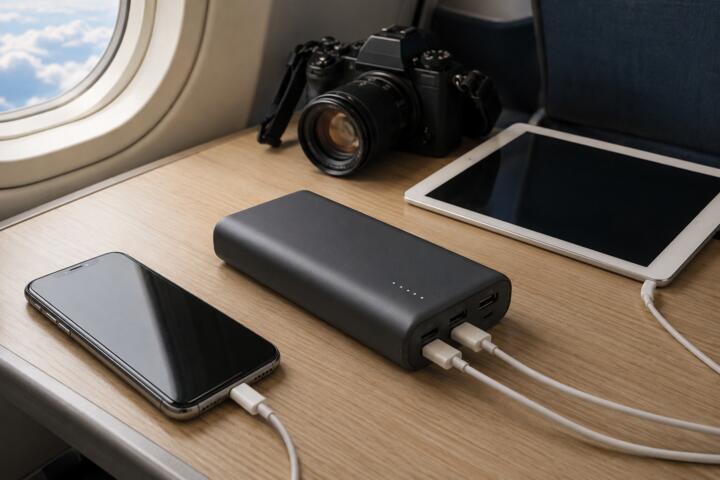
Long airport days change the equation. If you travel with tablets, cameras, portable Wi-Fi hotspots, or laptops, 20,000mAh gives breathing room without becoming ridiculous.
Anker Prime 20K and Baseus Blade models support 65W output, enough for many ultrabooks and USB-C laptops. That means a MacBook Air can recover meaningful battery life during a 90-minute layover.
Weight starts showing up here. Most 20K units land near 1 pound once cables enter the bag.
Look for USB-C PD
USB-C Power Delivery matters more than raw battery size now. PD lets devices negotiate faster charging safely, which means less time hugging airport walls beside random outlets.
A modern phone connected through USB-C PD may hit 50% in roughly 30 minutes under good conditions. Without PD support, charging slows dramatically.
That delay adds up.
Check both input and output specs. Some banks recharge themselves quickly but charge devices slowly. Others do the reverse.
Choose built-in cables carefully
Integrated cables sound gimmicky until you travel with them for 2 weeks. Suddenly you stop digging through backpacks at security checkpoints looking for cords tangled around noise-canceling headphones.
INIU and Anker both make travel banks with attached USB-C cables that double as carrying loops. The convenience feels small right until the moment you need it at 6:40 a.m. inside a crowded boarding lane.
Still, cables wear out. If the integrated cable fails after heavy use, some models become annoying very quickly.
Pay attention to wattage
Phones, tablets, cameras, drones, and laptops all pull different power levels. Wattage determines whether charging feels useful or symbolic.
An 18W bank handles phones comfortably. Around 30W starts helping tablets. Laptop charging becomes realistic near 45W to 65W depending on the machine.
Ignore vague labels like “super fast.” Look for exact numbers.
Bring the right cable
People spend $90 on premium power banks and pair them with gas-station cables that bend like shoelaces. Then they blame the battery.
A certified USB-C cable supporting 60W or 100W charging changes performance immediately. Brands like Nomad, Belkin, and Anker consistently test well under stress.
Carry one short cable. About 3 feet works well for planes and trains without turning your seat into spaghetti.
Think about heat
Heat quietly ruins charging speed. Leave a black power bank inside direct sun on a train table in Spain during July and performance drops hard.
Some premium models include temperature management that slows output before overheating starts. Nitecore does this well with lightweight travel-focused designs.
Do not bury batteries under hoodies, passports, snacks, and noise-canceling cases while charging. Airflow matters more than people think.
Know airline limits early
Most airlines permit lithium-ion batteries under 100Wh in carry-ons. Many prohibit them in checked luggage entirely. TSA officers rarely care about standard consumer banks under 27,000mAh, but giant camping batteries attract attention fast.
International travel complicates things. Some Asian carriers enforce limits more aggressively than domestic U.S. airlines.
Check before airport day. Not while standing barefoot at security holding a confused look and a backpack full of cables.
What Real Travelers Use
A freelance video editor flying between Berlin and Lisbon switched from a 30,000mAh bank to a 20,000mAh Anker 737 after realizing the heavier unit stayed in hotel rooms most of the time. The newer setup charged a MacBook Air to roughly 70% during flights while cutting nearly half a pound from the carry bag.
The difference showed up after 3 weeks of travel. Less shoulder strain, fewer cable issues, and faster top-ups between trains. Small improvements add up when you move constantly.
Another example came from a photographer covering hiking routes in Colorado. He carried two smaller 10,000mAh Nitecore units instead of one massive battery pack. That setup spread weight across different bags and reduced the risk of losing all backup power at once.
Redundancy beats bulk sometimes.
Cold weather mattered too. Lithium batteries drain faster in freezing temperatures, so rotating between two smaller packs worked better during long outdoor shoots around 20°F.
Quick Buying Checklist
| Need | Size | Output | BestUse |
|---|---|---|---|
| Weekend | 10K | 20W | Phones |
| RemoteWork | 20K | 65W | Laptop |
| Camping | 20K+ | 45W | MultiGear |
| UltraLight | 5K | 18W | Emergency |
Common Buying Mistakes
The first mistake is buying based on capacity alone. Bigger numbers look comforting online. They feel terrible after 11 hours in transit.
Another problem is ignoring recharge speed. Some cheap power banks take nearly a full day to recharge themselves through older micro-USB ports. Meanwhile, newer USB-C PD models refill in under 2 hours with proper chargers.
Slow gear gets abandoned.
People also underestimate durability. Travel destroys flimsy ports, weak cables, and glossy plastic shells. If the USB port wiggles after 4 months, the battery becomes unreliable right when you need it.
Counterfeit batteries create another mess. Fake Anker units and generic Amazon listings often exaggerate capacities wildly. Buy directly from manufacturers or established retailers instead of random marketplace sellers offering “70% OFF TODAY.”
Finally, travelers forget that charging ecosystems matter. Your wall charger, cable, device, and power bank all need compatible standards. One weak link slows the whole chain.
FAQ
What size power bank is best for travel?
For most travelers, 10,000mAh hits the best balance between portability and battery life. Frequent work travelers or laptop users usually benefit from 20,000mAh models.
Can I bring a power bank on a plane?
Yes, but it must stay in your carry-on bag. Most airlines accept lithium-ion batteries under 100Wh without approval, which covers many consumer travel power banks.
How many times can a 10,000mAh bank charge a phone?
Usually around 1.5 to 2 full phone charges depending on battery size, charging efficiency, and cable quality.
Do expensive power banks last longer?
Often yes. Premium brands tend to use better battery cells, stronger ports, safer temperature controls, and more accurate power ratings.
Is fast charging safe for phones?
Modern phones are designed for fast charging when paired with certified chargers and cables. Heat remains the bigger concern than charging speed itself.
Author's Insight
I stopped carrying giant power banks after realizing I was packing for imaginary emergencies. Most travel days only require one or two solid recharges, not enough backup power to survive a week in the mountains.
The best travel battery I ever used weighed under 7 ounces and charged quickly enough that I never worried about it. That changed how I pack. Lighter bags move faster through airports, fit better under train seats, and somehow make bad travel days feel less exhausting...
Summary
The right power bank depends on how you travel, not on the largest number printed on the box. Most people need a compact 10,000mAh USB-C PD model. Frequent travelers carrying laptops or camera gear should look closer at 20,000mAh units with 45W to 65W output.
Focus on charging standards, cable quality, airline limits, and real portability. A power bank should quietly solve problems. If it becomes another heavy object to manage, it is the wrong one.